Hello Everyone: A Playful Display Font for Web Design Projects
Testing Hello Everyone in a Real Web Layout
I recently started designing a landing page for a small creative studio, and I wanted a font that felt both modern and personable. That’s when I tried Hello Everyone in the hero section. From the moment I applied it over a soft pastel background, I knew it brought a unique charm to the layout. As a web designer, I’m always looking for typefaces that stand out without compromising usability, and this display font definitely caught my attention.
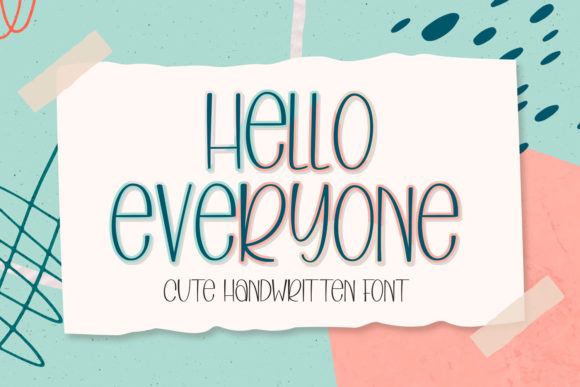
Hello Everyone is a clean, rounded script with smooth curves that give it a friendly and approachable personality. It’s not overly stylized like some decorative fonts, which makes it surprisingly versatile for digital use. I tested it in several areas of the site—main headlines, call-to-action buttons, and even as accent text on image banners—and each time, it added a sense of warmth and creativity to the design.
How Hello Everyone Performs in Web Design
One of the first things I noticed when using Hello Everyone was how well it worked in a responsive layout. I placed it in the hero section of the site, and at desktop size, it looked elegant and inviting. When I resized the browser, the font maintained its readability on tablet and mobile breakpoints, especially when used at slightly larger font sizes. It performed best as a headline font—perfect for hero titles, section headers, or featured quotes.
I also tested it over a background image to see how it would handle contrast and legibility. I used a soft-focus photo of a studio workspace and overlaid the text with a slight white background to help it pop. The result was clean and modern, and it didn’t feel overwhelming like some overly stylized script fonts can. This makes Hello Everyone a great choice for designers who want to add personality without sacrificing clarity.
When to Use (and When Not to Use) Hello Everyone
While Hello Everyone shines in larger, more prominent areas of a web layout, it’s not ideal for body text or small interface elements. I tried using it for a navigation menu and found that the rounded shapes became less distinct at smaller sizes, especially on mobile screens. The same went for form labels and button text—while it looked cute at a glance, it wasn’t the most legible option in those contexts.
That said, it worked beautifully in a digital brand kit I designed for a client who runs a creative workshop. I used it for the logo, hero section, and promotional banners, and paired it with a clean sans serif for the body copy. The contrast between the two created a strong visual hierarchy and helped guide the user’s eye through the page.
Here are a few ideal use cases for Hello Everyone:
- Hero headlines on landing pages
- Call-to-action buttons (in short phrases)
- Featured quotes or testimonials
- Logo text for creative brands
- Section headers on portfolio or blog sites
Font Pairing Tips for Web Designers
Pairing Hello Everyone with the right secondary font is key to making it work well in a web layout. Since it’s a playful and rounded display font, I recommend pairing it with something clean and minimalist. A simple sans serif like Open Sans or Lato works great for body text and navigation menus. If you’re going for a more editorial or high-end feel, a classic serif like Merriweather or Playfair Display can balance the whimsy of Hello Everyone while keeping the design grounded.
I also tested it with a bold sans serif for subheadings and found that it created a nice contrast without clashing. The key is to keep the supporting typography simple so that the Hello Everyone font can shine as the visual highlight of the page.
Technical Considerations for Web Use
Before using Hello Everyone in a live site, I checked the available file formats and webfont support. Fortunately, it came with all the necessary web-optimized formats—WOFF, WOFF2, TTF—which made integration into the CSS smooth and fast. I also appreciated the inclusion of multiple weights and ligatures, which gave me more flexibility in design.
It’s always important to check licensing when using a font in client work or commercial websites. Hello Everyone includes a commercial license, which made it easy to implement without any legal concerns. I also made sure to test load times and found that the font files were lightweight and didn’t slow down the page significantly.
For web designers, here’s what to look for when considering Hello Everyone:
- Webfont formats (WOFF, WOFF2, TTF)
- Font weights and styles
- Ligatures and alternate characters
- Multilingual support (especially for global brands)
- Commercial licensing terms
Final Thoughts
Hello Everyone is a well-crafted display font that brings a sense of warmth and creativity to web design. Whether you’re building a boutique online store, a creative portfolio, or a landing page for a service-based brand, this font can elevate your visual identity and help you connect with your audience on an emotional level. Just be sure to use it where it shines—large headlines, hero sections, and decorative accents—and pair it with a clean supporting font for balance.
As a web designer, I appreciate typefaces that are both beautiful and functional. Hello Everyone checks both boxes, and I’ll definitely be using it again in future projects where a touch of personality and approachability is needed.